Proper maintenance and cleaning of the laser system optics is crucial to ensure the long life and accuracy of the equipment. Even small dust particles or fingerprints can adversely affect beam quality, which can lead to reduced performance, damage to optical components or even the entire system. In this article, we’ll review best practices for safely and effectively cleaning a laser lens.
Blowing balloon
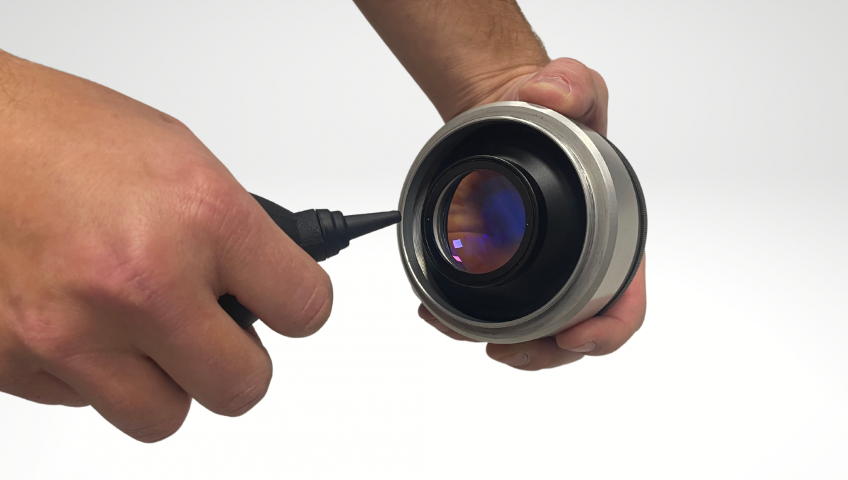
The easiest way to clean the optics, when dust impurities are detected, is by using an inflatable balloon. Without the need to put on protective gloves, the lens is blown from a reasonable distance. The blowing balloon should also be used before the lens is removed from the scanning head. It shall be blown into the scanning head from a reasonable distance onto the deflection mirrors so as to eliminate the risk of possible ingress and adherence of dust particles while the lens is removed.
Cleaning the lens with a cloth
The most effective cleaning method is using a microfiber cloth along with isopropyl alcohol. Latex gloves should be worn to avoid unwanted contact with the optics. A simpler method of cleaning is to use a cloth and lightly wipe the optics without applying isopropyl alcohol. This method should be applied if the optics are lightly soiled or if you have failed to blow off all dust particles when using a balloon. It is a good idea to use a flashlight at the same time to illuminate any dirt and particles clearly.
1. Unscrewing the lens from the scanning head
It is a good idea to clean the lens when it is unscrewed from the scanning head, especially as dirt or fingerprints may be visible.
2. Application of isopropyl alcohol
Apply isopropyl alcohol to a cloth or directly to the optics.
3.Wiping the lens with circular movements
The lens is wiped with a circular motion so that no residual dirt is visible. It is then advisable to wipe the lens with a dry cloth.
4.Inspection when rotating under light
Finally, it is necessary to check that the lens is really cleaned on the inside and outside and then screw it back into the scanning head. It is also advisable to use an inflation balloon and blow into the scanning head before putting the lens back.
Everything you need to clean the laser lens can be found in our optics cleaning kit.
Have we worked together before? We can help you expand the capabilities of your facility to suit your needs.
We use cookies and other services for content personalization, advertising and analytics. We share information about your use of the Site with partners who may combine it with other data as a result of your use of their services. By clicking "I Agree", you give us permission to process personal information and cookies for personalized content, advertising and analytics purposes.
Functional and technical (necessary)
Always active
Necessary cookies and services are essential for the proper functioning and display of the website, enabling basic navigation or filling out forms or logging into secure sections.
Předvolby
Technické uložení nebo přístup je nezbytný pro legitimní účel ukládání preferencí, které nejsou požadovány odběratelem nebo uživatelem.
Analytical
Analytics cookies and related services are useful in tracking visitor numbers and identifying traffic sources, allowing us to continually improve the performance of our website.Technické uložení nebo přístup, který se používá výhradně pro anonymní statistické účely. Bez předvolání, dobrovolného plnění ze strany vašeho Poskytovatele internetových služeb nebo dalších záznamů od třetí strany nelze informace, uložené nebo získané pouze pro tento účel, obvykle použít k vaší identifikaci.
Marketing
Some of our advertising partners may set cookies on our website. By granting consent, we may use the cookie or other personal information (phone, email or address) to create profiles based on your interests and then serve relevant advertising on other websites through advertising systems such as Meta Ads, Google Ads and Sklik.